Features
Everything your venue runs on, in one system.
From the first order to the end-of-day accounts. Explore the tools for service, stock, customers and staff, then book a demo tailored to your business.
Selling
Built for the rush.
A sale screen your staff learn in one shift, with the depth the kitchen needs behind every tap.
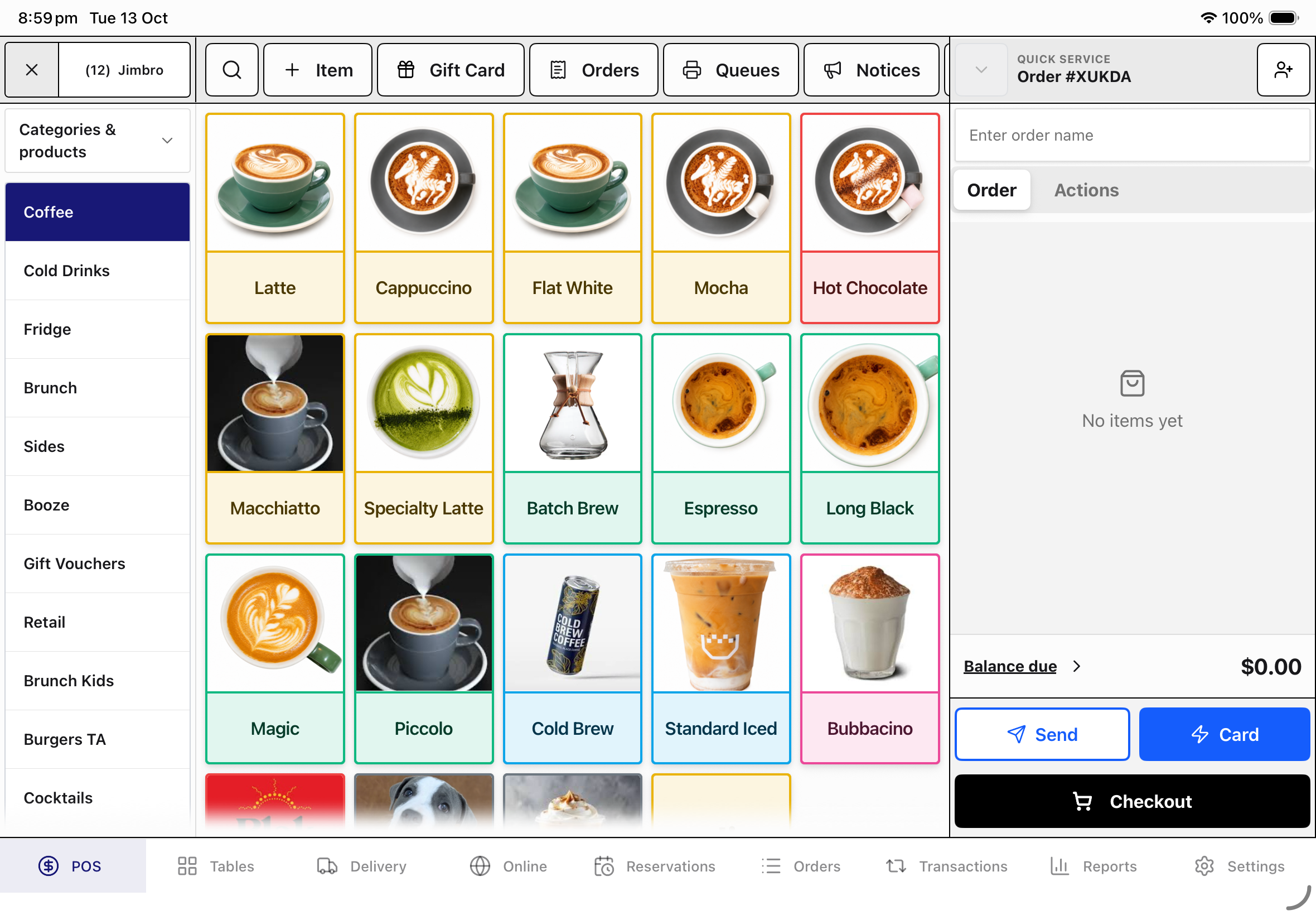
A grid built for the rush
Products by category or menu, with photos and search, in a layout you arrange by dragging.
Variants, modifiers and combos
Sizes with their own prices and barcodes, required or optional modifiers, and meal deals the kitchen reads line by line.
Dietary and allergen tags
Tags on every product, and paid swaps like gluten-free bread that price themselves.
Discounts with guardrails
An amount or a percentage off one item or the whole order, with caps and manager approval where you want it.
Split bills every way
Split evenly, by item or across payment methods, and pay several shares in one go.
Park and resume orders
Name an order, park it, and pick it up again when they’re ready.
Availability in one press
Long-press a product to mark it unavailable until a time you choose, or until further notice.
Keyed prices
For market-price dishes and one-offs: staff enter the price, starting from a suggestion.
Happy hour and member prices
Scheduled weekly price windows, and MiClub member prices applied when a member is attached to the order.
Sell by weight or volume
Price per kilo, per litre or per glass, then key in the quantity. One wine can sell by the bottle and by the glass.
Refunds that restock
Full or partial refunds, with a choice on each line to put the stock back, and GST reversed correctly.
Email and SMS receipts
Tax invoices by email, receipts by text, and reprints from order history.
Payments
Payments connected to the order.
Zeller is built in, cash is counted properly, and every charge is recorded before it is taken.
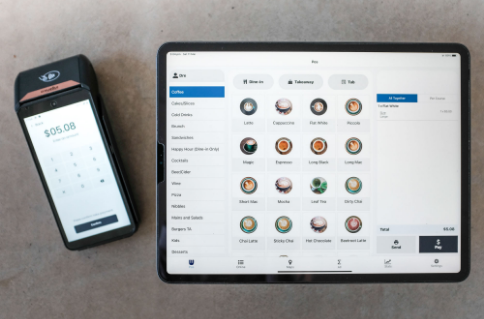
Zeller, built in
Pair a Zeller terminal and the amount, the tip and the result flow straight onto the order. Already with Zeller? We plug in. Not yet? We’ll set you up.
Payment recovery built in
Payment attempts are saved before the terminal is asked. Interrupted payments retain a record for recovery, helping staff check the outcome before trying again.
A backup terminal
Any standalone EFTPOS terminal can sit alongside, recorded against the order so it still reconciles.
Tips, your way
Add a tip to the order, or let the customer choose one on the terminal.
Cash that counts
Quick-cash buttons, change worked out for you, and 5c rounding applied after GST.
Online card payments
Online orders are paid by card through Stripe, straight into your own account.
Tables
Your floor, on one screen.
Floor plans, covers, timers and courses, so the whole team can see where every table is at.
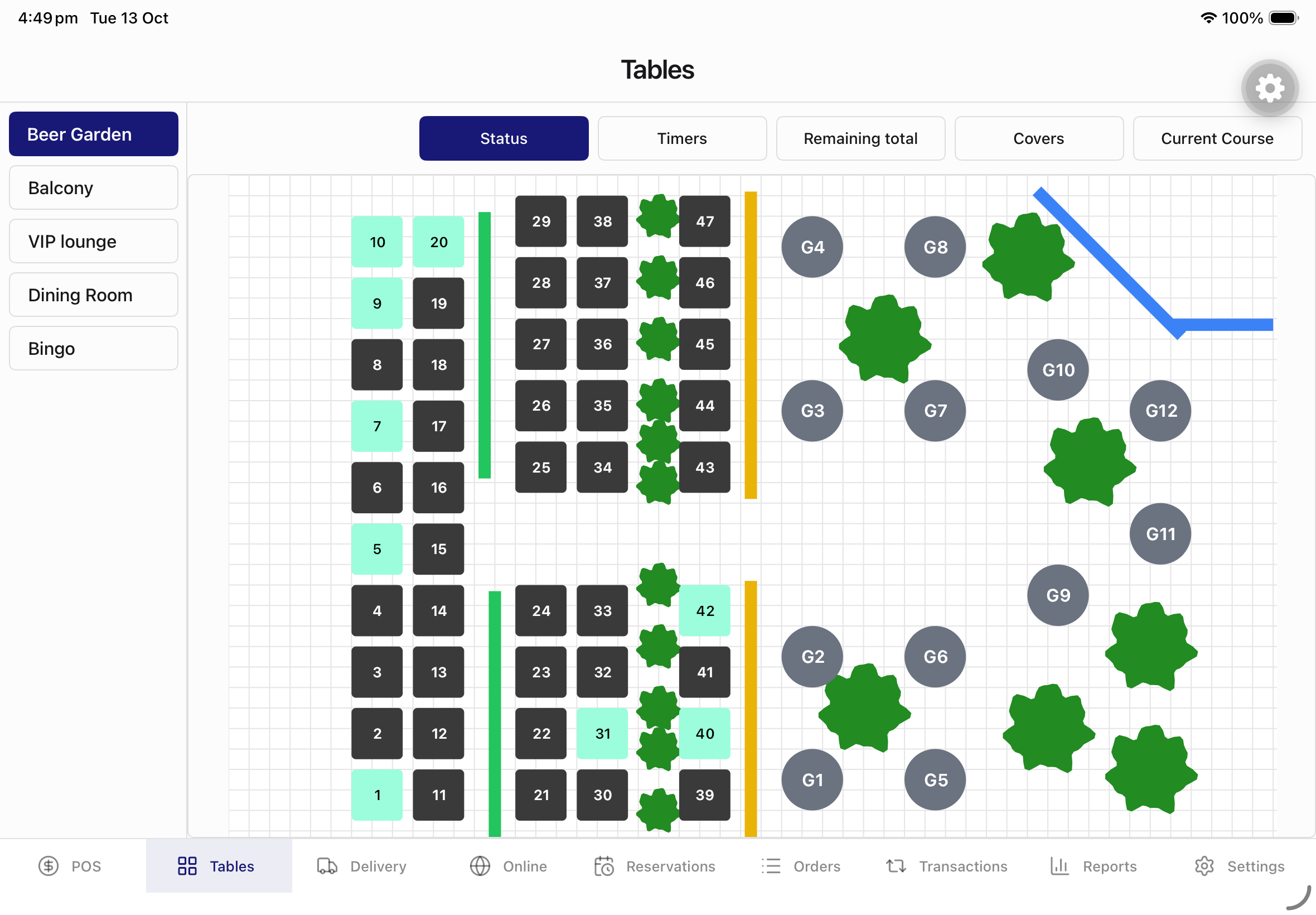
Floor plans
Draw your tables, bar and walls, with a plan for every room: dining, patio, functions.
Live table status
See which tables are open and how long they’ve been seated, with several orders on one table when you need them.
Covers and table timers
Open a table with its covers and watch its timer move from green to amber to red.
Courses and fire
Take the order by course, send dockets grouped by course, and fire the next one when the table is ready.
Move and merge
Move items or whole orders between tables, turn a takeaway into a table, or merge two orders, safely even if the connection drops.
A QR code for every table
Generate table QR codes straight from the floor plan, ready for ordering from the table.
Kitchen
The pass, on a screen or on paper.
Route every product to the station that makes it, on a kitchen screen, a docket printer or both.
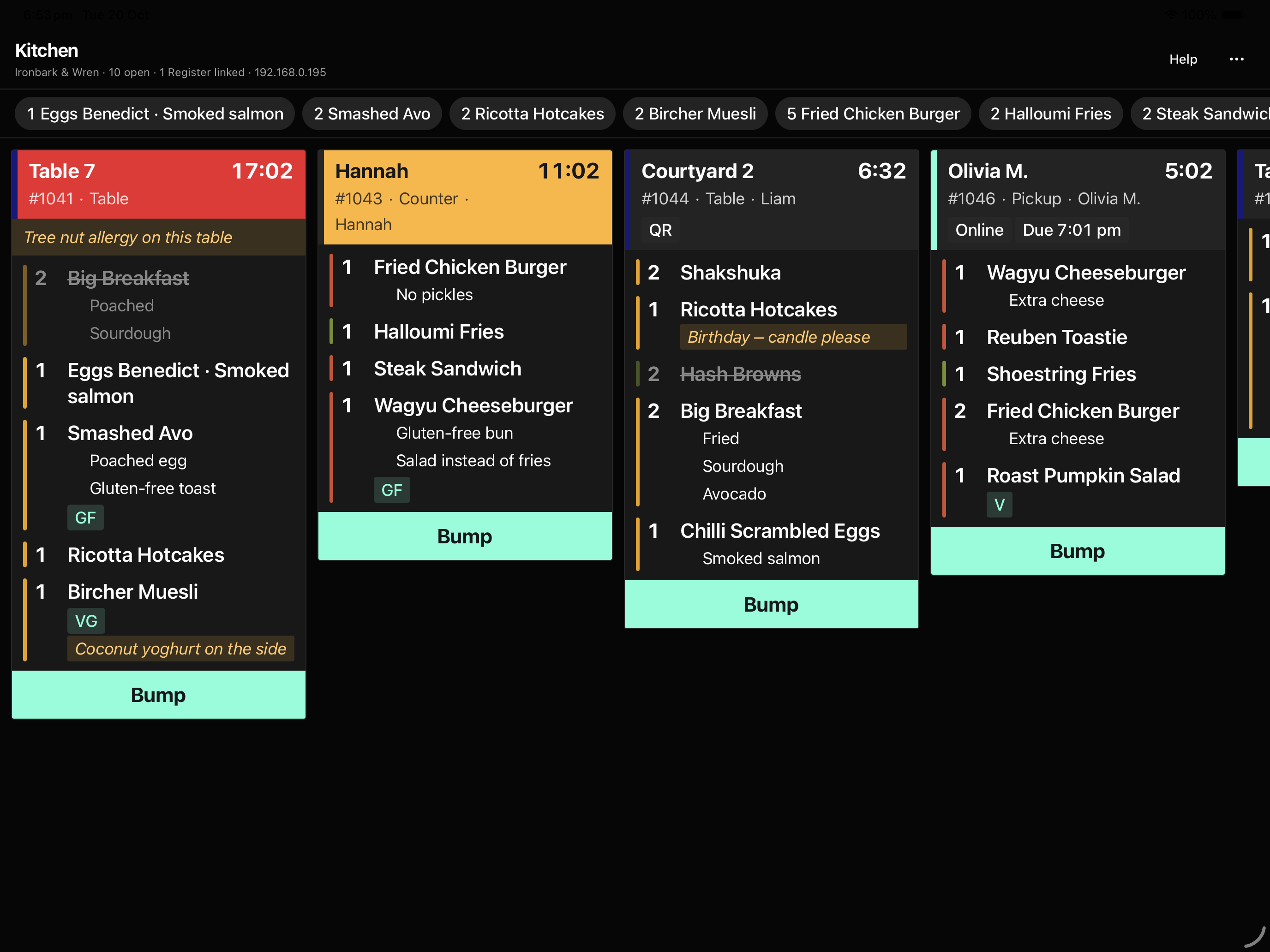
Kitchen Screen
A tablet at each station shows its tickets as they’re sent. Bump when it’s done, recall when it isn’t, and it keeps running over the venue’s own network when the internet drops.
A screen for the pass
For whoever runs the pass (the expo): one screen shows every ticket in the kitchen, and bumping an order rings a bell so front of house knows it’s ready.
Kitchen routing
Send each category or product to the station that makes it, on a screen, a printer or both, with a second route for when a printer is down.
Dockets that read cleanly
Every docket, bill and tax invoice is drawn as one crisp image: your logo, clear type and QR codes, the same on every printer.
Kitchen names
Short names on dockets, like LG FLAT WHT, so the pass reads at a glance.
Prints that don’t go missing
Every print is logged against its order, so a lost job comes back to staff to review instead of vanishing or printing twice.
Auto-print and cash drawer
Print the receipt and open the drawer on every sale, set register by register.
Stock
Stock in the units you actually buy.
Millilitres, grams, bottles and cases, ordered from suppliers, deducted by recipe as you sell and counted when you stocktake.
Measured the way you buy
Track spirits, kegs, milk and beans in millilitres, grams or each, with named units like Bottle and Case.
Recipes that deduct
A cocktail takes 60 mL of gin and 30 mL of vermouth. Stock comes off as you sell and goes back on a refund.
Singles, six-packs and slabs
One pool of stock whether a beer sells on its own, by the six-pack or by the slab.
Stocktakes with variance
Count, compare and see the variance, with deliveries, wastage and every movement kept on record.
Low-stock warnings
Set a threshold and the till flags items that are running low or out as staff sell them.
Suppliers and purchase orders
Keep your suppliers on file, raise purchase orders and receive deliveries against them, so stock and costs update as the boxes arrive.
Supplier invoices, read for you
Use a PDF or photo to draft suppliers, inventory, stock receipts or acquisition costs with separate AI tools. Review the details and confirm quantities before saving.
Stock reports by email
Inventory reports as PDFs, sent to whoever needs them.
Customers
Know your regulars.
One customer record across every store, their usual order on the till, and a loyalty card that lives in their phone’s wallet.
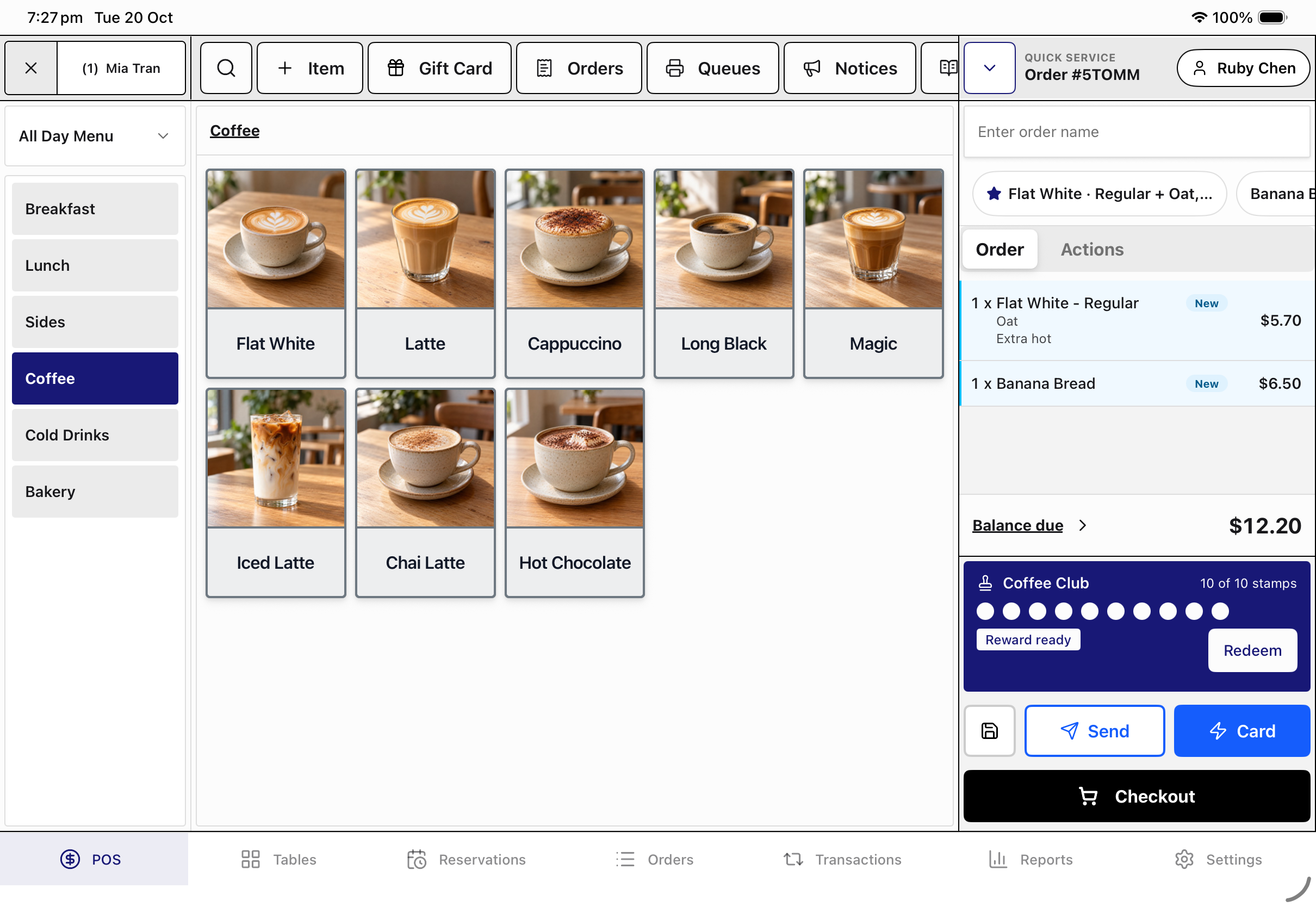
Customer profiles
One record for each customer across all your stores, with their visits and your notes.
Their usual, one tap away
Attach a customer and the orders they come back for appear on the sale screen.
Loyalty points
Run a points program on the till itself. Earn per dollar or per item, and reward with money off or a free product.
A loyalty card in their Wallet
Customers add your card to Apple Wallet or Google Wallet from a link or the QR poster on your counter. There’s no app to download, and the balance updates after every visit.
Milestone rewards
A ladder of one-off rewards as lifetime points grow, a mug first and something bigger later, alongside or instead of the repeating reward.
Scan the pass at the till
Scan a Wallet pass or a gift card with the barcode scanner or the camera, and the customer or card is on the order.
Gift cards and accounts
Gift cards, tabs and member accounts.
Money held for your customers, tracked movement by movement and reconciled to your books.
Gift cards
Sell them at the till or online, email them to the recipient and redeem them at the till. They never expire.
House accounts
Let regulars and members run an account with a limit and terms, repay it at the till, and receive emailed statements.
MiClub member accounts
Scan or search a member, charge their MiClub account and take top-ups at the bar.
Quotes
Quote the function from the till.
Catering and function quotes with revisions, a PDF and a link your customer can open.
Function and catering quotes
Numbered quotes with revisions, a PDF, an expiry date and a link your customer can open, emailed from the till.
Reporting
Sales, margins and hours on the tablet.
The reports you check every day are built in, margins included. For everything else, ask the AI Assistant.
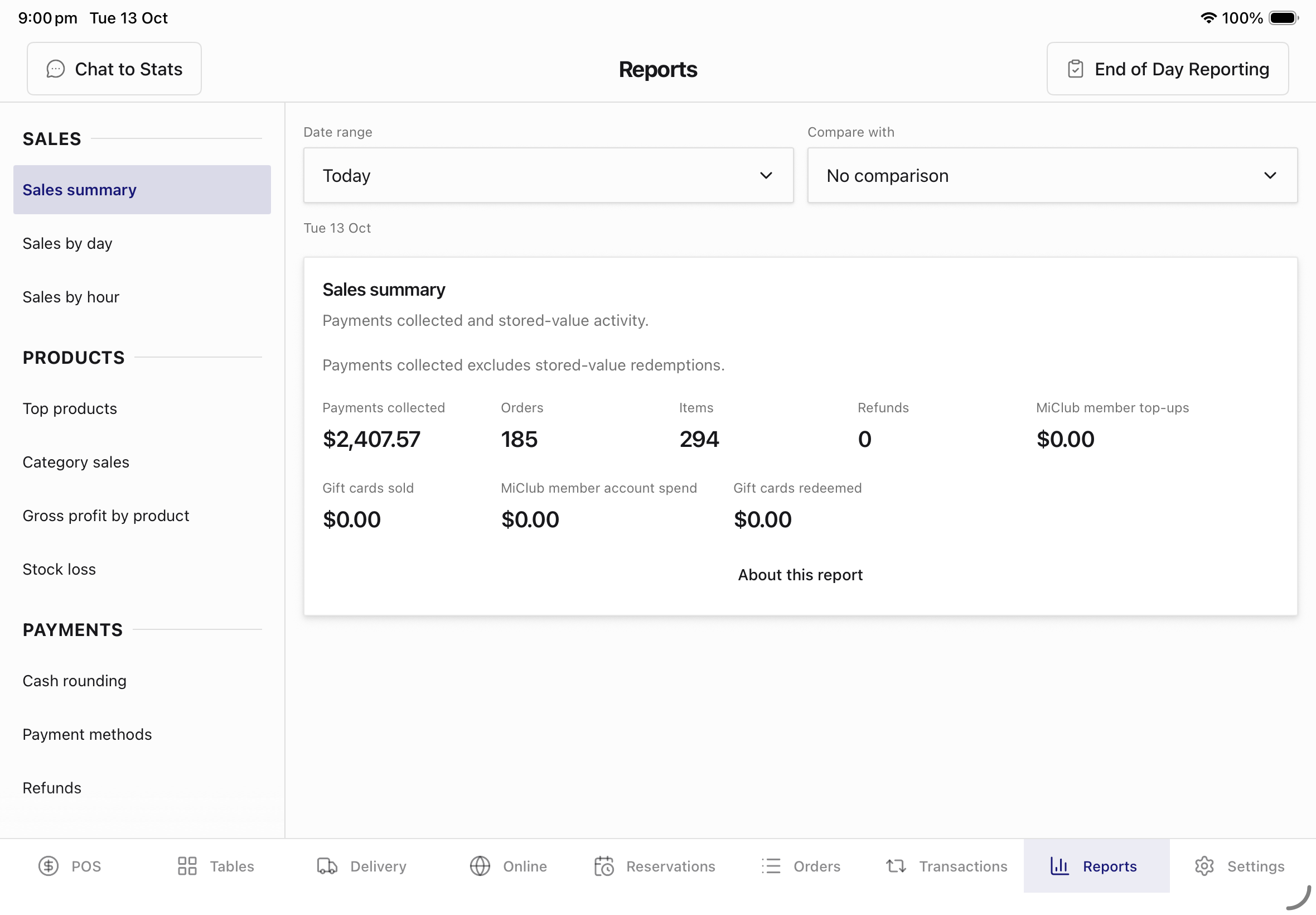
Reports, built in
Sales by day and by hour, top products, categories, payment methods, refunds and GST, compared with the previous period.
AI Assistant
Ask “what sold best last Saturday?” or “who’s on shift?” in plain English, typed or spoken, and get the answer with the figures behind it.
A close-of-day email
A short summary of the day lands in the owner’s inbox after close: sales, what sold and anything worth a look.
Costs and margins
Every sale records what it cost you, so reports show gross profit by product and by day next to sales.
Staff hours
Hours worked from the time clock, by person and by day, with shifts that need a look flagged for review.
The right trading day
Sales after midnight count to the night you traded, with a cutoff set for each store, in every Australian time zone.
GST and Xero
GST that stands up. Books that reconcile.
Australian tax rules applied on every line, and a settlement in Xero every morning.
Same bottle, different GST.
Bottled water is GST-free to take away but taxable when it’s consumed on the premises. Whoods decides line by line from how the order is served.
Tax invoice
Takeaway
- Still water 600 mL(GST-free)$5.00
Total$5.00
GST included$0.00
Cash rounding that leaves the tax alone.
Cash is rounded to the nearest 5 cents after GST is worked out, so the invoice shows GST on what the customer actually bought, and the rounding is recorded separately on the payment.
Tax invoice
Takeaway · Paid in cash
- Toasted sandwich$10.02
Total$10.02
Cash rounding−$0.02
Paid in cash$10.00
GST included$0.91
GST that stands up
Dine-in and takeaway treated correctly on every line, GST rounded once per order, and a tax invoice or a receipt depending on your registration.
Xero, reconciled nightly
A settlement invoice for each store every night, with sales by account, payments to clearing accounts and gift card balances held as liabilities.
Staff
Staff who get it on their first shift.
A till new staff pick up straight away, help built into the app, rosters by email and the right permissions for everyone.
Roles and permissions
Around 30 permissions, from refunds and voids to price overrides, and a manager can approve on the spot.
Quick staff sign-in
Staff sign in to the register with a PIN, or skip sign-in entirely for a one-person counter.
Time clock
Clock in, clock out and record breaks at the register.
Rosters by email
Build the week’s roster on the tablet and send it. Each person gets their own shifts and the full roster by email.
Store noticeboard
Post a notice for the team, see who has read it, and let staff reply on the tablet instead of a group chat.
Activity log
Voids, refunds, discounts and drawer opens, with who did them and when, in one list a manager can scan.
Cash drawer shifts
Opening and closing counts, money in and out, no-sale opens and the variance at close.
Back office
One business, many stores.
Run every venue under one account, and manage it from the tablet or any browser.
Built for groups
Several businesses and stores under one account, each with its own ABN, GST registration and registers.
A back office in your browser
Manage stores, products, menus, staff, roles and printers from any computer.
Help built into the app
Step-by-step guides on the tablet and in the back office, from the first sale to setting up a kitchen screen.
iPad, Android or phone
Runs on iPad and Android tablets, and the sale screen, history and reports adapt to a phone.
Reliability
When the internet drops, you keep trading.
Built on the assumption that something will fail on a Saturday night, and that it must not cost you a sale.
Keeps trading offline
Sales are saved on the tablet first and sync when the connection comes back.
Tablets that share orders offline
When the internet drops, your tablets share open orders over the venue’s own network, so any till can pick up any table.
4G backup
When the venue’s internet drops, a 4G connection keeps you online.
A record you can audit
Every order keeps an add-only history of changes, payments and prints. Totals are calculated from it, never typed over.
Online ordering and bookings
Your next order can start anywhere.
Bring QR table orders, pickup, delivery, click and collect, catering and reservations into the same working day. Explore the customer experience on our online ordering page.
QR table ordering
Guests scan the code on the table, browse your menu and order. They pay at the counter or online by card, and follow their order’s status on their phone.
Order-ahead pickup
Prepaid orders with a ready time. Customers get a text when it’s ready, and an automatic refund if you can’t take it.
Order today, collect later
Customers choose a pickup time later today or later in the week, and the order reaches the kitchen when it should.
Delivery with your own drivers
Draw your delivery area on a map, quote an arrival time, and send prepaid orders out with your own team. No marketplace in the middle.
An online shop
Sell coffee beans, merchandise and retail lines for click and collect, drawn from the same stock as the till, so it stops selling when you run out.
Catering orders online
Customers choose a collection date and time, order platters from your catering menu and pay up front.
Gift cards online
Customers buy a gift card from your page and it’s emailed to the recipient, ready to use at the till.
Customer sign-in
Customers sign in with a one-time code, no password, to see their rewards and earn points on online orders.
Listed where locals look
Opt in to the whoods.online directory so people nearby can find your venue, your menu and your booking page.
Online reservations
Guests book in a few taps and can cancel from their confirmation email. You set covers and arrivals per time slot, minimum notice and how far ahead they can book.
Bookings on the tablet
A day view with Booked, Seated and No-show, guest tags like Birthday, Allergy and High chair, and an alert for each new online booking.
Online orders on the tablet
A sound and a badge for every order, accept or reject in a tap, paid orders printed automatically, and a pause button for when the kitchen is slammed.
Your hours, your prep time
Take online orders around the clock or only while you’re open, and set the prep time customers are quoted.
Same order, same rules
Online orders carry the same GST, dockets and reports as orders taken at the till.
Let’s talk about your venue.
Tell us how you run service today and we’ll show you what changes. No obligation, no lock-in contracts.